全球主机交流论坛

标题: 内核Kernel 4.9正式版(支持BBR) For CentOS 6/7 x86_64 [打印本页]

作者: cgs3238    时间: 2016-12-8 14:44
标题: 内核Kernel 4.9正式版(支持BBR) For CentOS 6/7 x86_64
本帖最后由 cgs3238 于 2016-12-23 14:57 编辑

(, 下载次数: 2)


如果对本人不放心,可以使用elrepo的rpm包,比我需要多一个设置grub启动项以及sysctl的操作


本人脚本特点:
1、无需手动修改grub启动项;
2、已经默认设置拥塞算法为BBR,无需额外设置,重启即可用;
3、更新至4.9正式版

OpenVZ的就不要试了,不可用


注意,本人编译的内核bbr不是模块化的,通过lsmod|grep bbr是查不到结果的,fq也是。

安装:
  1. wget -O- http://soft.wellphp.com/scripts/install_bbr_centos.sh | bash
复制代码


重启:
  1. reboot
复制代码

重启之后验证是否已经成功:

验证:
  1. sysctl net.ipv4.tcp_congestion_control net.core.default_qdisc
复制代码


结果:
  1. net.ipv4.tcp_congestion_control = bbr
  2. net.core.default_qdisc = fq
复制代码


原文:
http://www.wellphp.com/2016/12/0 ... %E7%AE%97%E6%B3%95/

已经在CAC、LetBox、自建Promox中测试成功,也遇到过无法启动的问题不过已经解决,如果你不幸失败,请通过VNC切换到旧内核。
作者: wtycn    时间: 2016-12-8 14:45
centos7 centos6?
作者: zjsay    时间: 2016-12-8 14:46
期待一键安装包,别让大家失望哈
作者: crazyalllife    时间: 2016-12-8 14:47
严重期待中~
作者: 東華    时间: 2016-12-8 14:50
格盘坐等一键包
作者: tamicrealo    时间: 2016-12-8 14:51
然而好的线路并不需要锐速什么的,,,直接跑满
作者: 大雄。    时间: 2016-12-8 14:53
前排围观  

作者: suzizi    时间: 2016-12-8 14:54
提示: 作者被禁止或删除 内容自动屏蔽
作者: sunday    时间: 2016-12-8 14:54
東華 发表于 2016-12-8 14:50
格盘坐等一键包

鼎力支持楼主
作者: ngeel    时间: 2016-12-8 14:56
centos7 centos6  centos5  32位64位
作者: 怪人    时间: 2016-12-8 14:57
提示: 作者被禁止或删除 内容自动屏蔽
作者: 76997876    时间: 2016-12-8 15:16
我只想知道,OVZ是不是要哭晕在厕所
作者: newyoung    时间: 2016-12-8 15:20
坐等。。。。
作者: itsme    时间: 2016-12-8 15:40
支持楼主。
作者: liuyehe    时间: 2016-12-8 15:43
坐等,谢谢大神
作者: 菜花大盗    时间: 2016-12-8 16:09

作者: teepsn    时间: 2016-12-8 16:14
支持楼主,坐等一键包
作者: cgs3238    时间: 2016-12-9 09:40
不好意思,已经更新文章
作者: litter123    时间: 2016-12-9 09:42
cgs3238 发表于 2016-12-9 09:40
不好意思,已经更新文章

BBR对OVZ有用吗?
作者: cgs3238    时间: 2016-12-9 09:42
litter123 发表于 2016-12-9 09:42
BBR对OVZ有用吗?

OVZ客户机是没法更新内核滴,所以没用
作者: means    时间: 2016-12-9 09:44
收藏备用,楼主伟大
作者: 肆无忌惮    时间: 2016-12-9 10:04
提示: 作者被禁止或删除 内容自动屏蔽
作者: yilin101    时间: 2016-12-9 10:09
想在linode试一下 万一启动不了有什么方法?。另外卸载命令有吗
作者: cgs3238    时间: 2016-12-9 10:10
肆无忌惮 发表于 2016-12-9 10:04
net.ipv4.tcp_congestion_control = bbr
error: "Input/output error" reading key "net.ipv6.conf.all.sta ...

这个可以忽略,新内核的新特性
作者: wxl1380610    时间: 2016-12-9 10:10
肆无忌惮 发表于 2016-12-9 10:04
net.ipv4.tcp_congestion_control = bbr
error: "Input/output error" reading key "net.ipv6.conf.all.sta ...

同样错误
作者: 肆无忌惮    时间: 2016-12-9 10:11
提示: 作者被禁止或删除 内容自动屏蔽
作者: cgs3238    时间: 2016-12-9 10:13
yilin101 发表于 2016-12-9 10:09
想在linode试一下 万一启动不了有什么方法?。另外卸载命令有吗

linode比较特殊,安装也需要额外操作,我就不试了;
如果失败了,面板里面有内核选择,选择之前的就可以
作者: 李沁峰    时间: 2016-12-9 10:43
搬瓦工,安装不上。
error: Failed dependencies:
        grubby >= 7.0.4-1 is needed by kernel-ml-4.9.0-rc8.el6.x86_64
        dracut-kernel >= 002-18.git413bcf78 is needed by kernel-ml-4.9.0-rc8.el6.x86_64
        /sbin/new-kernel-pkg is needed by kernel-ml-4.9.0-rc8.el6.x86_64
Checking if the installtion is ok
ls: cannot access /etc/grub2.cfg: No such file or directory
ls: cannot access /boot/grub/grub.conf: No such file or directory

Installation is completed, now you can reboot the system.
You should check BBR after the rebooting using command:

     sysctl -a|grep congestion_control

作者: cgs3238    时间: 2016-12-9 10:51
李沁峰 发表于 2016-12-9 10:43
搬瓦工,安装不上。
error: Failed dependencies:
        grubby >= 7.0.4-1 is needed by kernel-ml-4.9.0-rc8.e ...

搬瓦工是OVZ,不行的
作者: 左手写爱    时间: 2016-12-9 11:04
楼主我爱死你了,已经收藏

过几天开个新小鸡试试
作者: yumin9822    时间: 2016-12-9 11:21
本帖最后由 yumin9822 于 2016-12-9 11:49 编辑

确认了安装LZ的包不会出现下面的问题。产生下面的问题是因为安装了这里的内核http://elrepo.org/people/ajb/devel/kernel-ml/el6/x86_64/RPMS/


CentOS 6 x86_64 一步一步安装发现一个问题
KVersion=4.9.0-rc8
但是运行
  1. grep '^title ' /boot/grub/grub.conf | awk -F'title ' '{print i++ " : " $2}'
复制代码
出现类似输出
0 : CentOS (4.9.0-0.rc8.el6.elrepo.x86_64)
1 : CentOS (2.6.32-504.12.2.el6.x86_64)
2 : CentOS 6 (2.6.32-504.el6.x86_64)
这时候
  1. grep '^title ' /boot/grub/grub.conf | awk -F'title ' '{print i++ " : " $2}' | grep ${KVersion}
复制代码
输出为空

解决方法如下:
  1. INS_OK=`grep '^title ' /boot/grub/grub.conf | awk -F'title ' '{print i++ " : " $2}' | grep ${KVersion} | grep -v debug | cut -d' ' -f1`
复制代码

修改为
  1. INS_OK=`grep '^title ' /boot/grub/grub.conf | awk -F'title ' '{print i++ " : " $2}' | grep  ${KVersion%-*}| grep -v debug | cut -d' ' -f1`
复制代码


参考这里
http://xiaosu.blog.51cto.com/2914416/735189
作者: o0o    时间: 2016-12-9 11:25
可惜不支持linode ,求linode教程!
作者: cgs3238    时间: 2016-12-9 11:25
yumin9822 发表于 2016-12-9 11:21
CentOS 6 x86_64 一步一步安装发现一个问题
KVersion=4.9.0-rc8
但是运行出现类似输出

你曾经安装过其他4.9.0内核吧?你可以仔细看下,我的rpm是不带-0的,你这样还是没有用上我的rpm
作者: yumin9822    时间: 2016-12-9 11:30
cgs3238 发表于 2016-12-9 11:25
你曾经安装过其他4.9.0内核吧?你可以仔细看下,我的rpm是不带-0的,你这样还是没有用上我的rpm ...

我装的是这里的
http://elrepo.org/people/ajb/devel/kernel-ml/el6/x86_64/RPMS/
作者: cgs3238    时间: 2016-12-9 11:33
yumin9822 发表于 2016-12-9 11:30
我装的是这里的
http://elrepo.org/people/ajb/devel/kernel-ml/el6/x86_64/RPMS/

不要装那个,用我编译的RPM,可以先删掉那个
作者: yumin9822    时间: 2016-12-9 11:36
本帖最后由 yumin9822 于 2016-12-9 11:43 编辑
cgs3238 发表于 2016-12-9 11:33
不要装那个,用我编译的RPM,可以先删掉那个


好的。我这就试一下。
测试通过。默认开启bbr,赞一下!
作者: 砍柴郎    时间: 2016-12-9 11:54
Sorry, I can only support x64 yet.

作者: caogen9    时间: 2016-12-9 13:08
一键包安装后 表示挂了

作者: cgs3238    时间: 2016-12-9 13:11
caogen9 发表于 2016-12-9 13:08
一键包安装后 表示挂了

怎么个挂法?有没有截图?
作者: buzz    时间: 2016-12-9 13:27
linode用不了啊
作者: 砍柴郎    时间: 2016-12-9 13:28
caogen9 发表于 2016-12-9 13:08
一键包安装后 表示挂了

我的也是这样,装好后,VPS控制面板显示机子是启动的,但SSH连不上。多次装了都一样。
作者: qishao47    时间: 2016-12-9 13:32
要是OpenVZ能用就好了
作者: BQQ    时间: 2016-12-9 13:32
感觉这个一键包还是有BUG,等成熟了才敢用啊。
作者: cgs3238    时间: 2016-12-9 13:39
BQQ 发表于 2016-12-9 13:32
感觉这个一键包还是有BUG,等成熟了才敢用啊。

可以查看源码,欢迎修改
作者: 蓝鹰    时间: 2016-12-9 13:39
提示: 作者被禁止或删除 内容自动屏蔽
作者: cgs3238    时间: 2016-12-9 13:41
蓝鹰 发表于 2016-12-9 13:39
只有64位的机器才可以安装?

目前是这样的,因为涉及测试,精力有限,请其他大佬补充
作者: 水果大笨蛋    时间: 2016-12-9 13:46
收藏
作者: 蓝鹰    时间: 2016-12-9 13:48
提示: 作者被禁止或删除 内容自动屏蔽
作者: caogen9    时间: 2016-12-9 13:54
cgs3238 发表于 2016-12-9 13:11
怎么个挂法?有没有截图?

大佬 传送门 http://hostloc.gdisk.cf/thread-342692-1-1.html
作者: cgs3238    时间: 2016-12-9 14:01
caogen9 发表于 2016-12-9 13:54
大佬 传送门 http://hostloc.gdisk.cf/thread-342692-1-1.html

你是不是装过其他人分享的4.9.0内核?你这个错误我遇到过,我编译的内核已经解决了的
作者: yumin9822    时间: 2016-12-9 14:08
最新vultr.com CentOS 7 测试出现的问题
出现两个选项
  1. [root@vultr ~]# awk -F\' '$1=="menuentry " {print i++ " : " $2}' /etc/grub2.cfg | grep 4.9.0-rc8
  2. 0 : CentOS Linux 7 Rescue 78f7cabf5dbe44a6a43e2fe24c16f24b (4.9.0-rc8.el7.centos.x86_64)
  3. 1 : CentOS Linux (4.9.0-rc8.el7.centos.x86_64) 7 (Core)
复制代码


解决方法
  1. awk -F\' '$1=="menuentry " {print i++ " : " $2}' /etc/grub2.cfg | grep ${KVersion}|grep -v -i debug |grep -i -v rescue| cut -d' ' -f1
复制代码

作者: caogen9    时间: 2016-12-9 14:16
cgs3238 发表于 2016-12-9 14:01
你是不是装过其他人分享的4.9.0内核?你这个错误我遇到过,我编译的内核已经解决了的 ...

原生态的
作者: linode-jspinosi    时间: 2016-12-9 14:23
yumin9822 发表于 2016-12-9 14:08
最新vultr.com CentOS 7 测试出现的问题
出现两个选项

linode Centos 7 用不了

  1. Start installing
  2. Retrieving http://soft.wellphp.com/kernels/x86_64/kernel-ml-4.9.0-rc8.el7.centos.x86_64.rpm
  3. Preparing...                          ################################# [100%]
  4. Updating / installing...
  5.    1:kernel-ml-4.9.0-rc8.el7.centos   ################################# [100%]
  6. grubby fatal error: unable to find a suitable template
  7. Checking if the installtion is ok
  8. Sorry, install failed, please contact the author
复制代码

作者: 耍猴    时间: 2016-12-9 14:46
已收藏
作者: linode-jspinosi    时间: 2016-12-9 14:53
cgs3238 发表于 2016-12-9 14:01
你是不是装过其他人分享的4.9.0内核?你这个错误我遇到过,我编译的内核已经解决了的 ...


大佬 linode Centos 7 用不了


  1. Start installing
  2. Retrieving http://soft.wellphp.com/kernels/x86_64/kernel-ml-4.9.0-rc8.el7.centos.x86_64.rpm
  3. Preparing...                          ################################# [100%]
  4. Updating / installing...
  5.    1:kernel-ml-4.9.0-rc8.el7.centos   ################################# [100%]
  6. grubby fatal error: unable to find a suitable template
  7. Checking if the installtion is ok
  8. Sorry, install failed, please contact the author
复制代码

作者: 李沁峰    时间: 2016-12-9 15:08
cgs3238 发表于 2016-12-9 10:51
搬瓦工是OVZ,不行的

谢谢,明白了。
作者: cgs3238    时间: 2016-12-9 15:18
linode-jspinosi 发表于 2016-12-9 14:53
大佬 linode Centos 7 用不了

没钱开linode测试,哈哈
作者: jker    时间: 2016-12-9 16:14
码一下,好用
作者: yumin9822    时间: 2016-12-9 16:16
本帖最后由 yumin9822 于 2016-12-9 16:18 编辑
蓝鹰 发表于 2016-12-9 13:48
Sorry, I can only support x64 yet.

i386请使用这个
http://elrepo.org/people/ajb/devel/kernel-ml/el6/x86_32/RPMS/kernel-ml-4.9.0-0.rc8.el6.elrepo.i686.rpm

用了这个,LZ的脚本就得修改一下才能使用

作者: yumin9822    时间: 2016-12-9 17:01
本帖最后由 yumin9822 于 2016-12-9 17:13 编辑

开了一个Linode小鸡测试,结果管理页面卡机了。登录不进去

初步看下来稍微麻烦点,更换内核
centos6参考这里
https://www.linode.com/docs/tools-reference/custom-kernels-distros/run-a-distributionsupplied-kernel-with-pvgrub#centos-6-and-newer

centos7参考这里
自己更换内核
XEN
http://madlax.pw/2016/06/15/57.html
KVM
http://madlax.pw/2016/12/03/103.html

centos6 KVM教程如下:
  1. yum install epel-release
  2. yum install grub grubby
  3. rpm -Uvh http://soft.wellphp.com/kernels/x86_64/kernel-ml-4.9.0-rc8.el6.x86_64.rpm
  4. cat >> /boot/grub/menu.lst<<-EOF
  5. timeout 5
  6. title CentOS6 (4.9.0-rc8)
  7. root (hd0)
  8. kernel /boot/vmlinuz-4.9.0-rc8.el6.x86_64 root=/dev/sda
  9. initrd /boot/initramfs-4.9.0-rc8.el6.x86_64.img
  10. EOF
复制代码

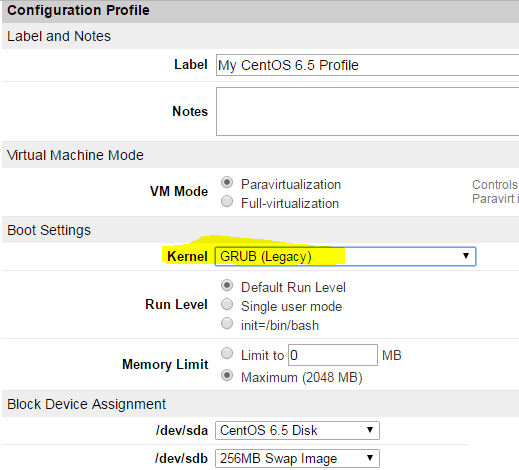
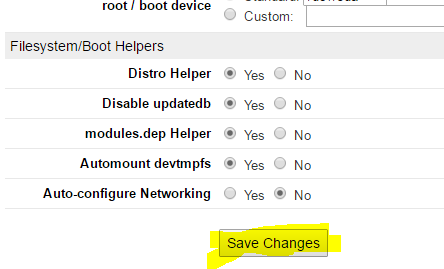
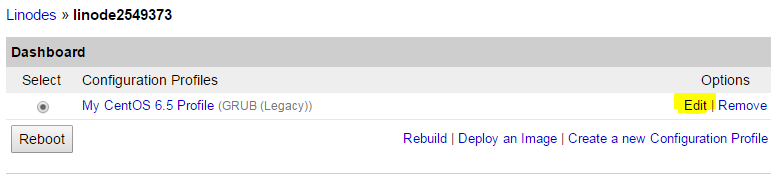
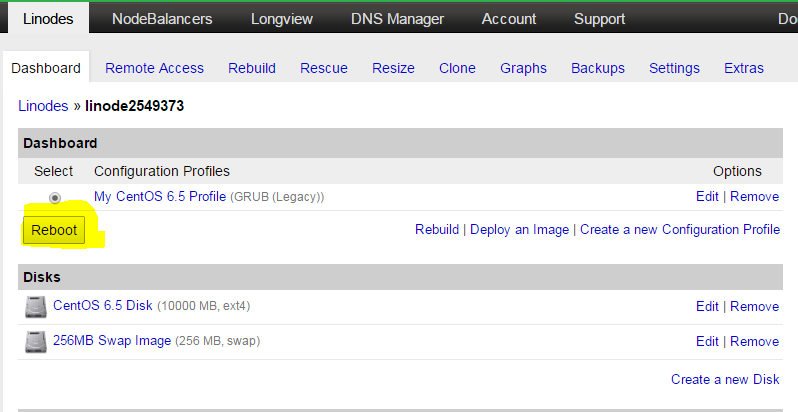
然后进入控制台按下面操作


重启后,进入系统就是新内核了。哈哈

作者: o0o    时间: 2016-12-9 17:02
出个 linode  教程!
作者: 违法主机    时间: 2016-12-9 17:11
出错了
作者: vvx.cc    时间: 2016-12-9 18:31
支持.128小鸡可以不
作者: 蓝鹰    时间: 2016-12-9 19:18
提示: 作者被禁止或删除 内容自动屏蔽
作者: dantengde    时间: 2016-12-10 11:47
已经测试,效果不错
作者: phpsky    时间: 2016-12-10 20:42
装完好像延迟更大了
作者: amorg    时间: 2016-12-11 00:20
不行哦,我的还是net.ipv4.tcp_congestion_control = cubic
digitalocean centos6.8 x64
作者: cgs3238    时间: 2016-12-11 09:27
amorg 发表于 2016-12-11 00:20
不行哦,我的还是net.ipv4.tcp_congestion_control = cubic
digitalocean centos6.8 x64

贴一下你的 uname -a 结果
作者: vultrlinode    时间: 2016-12-11 09:43
Sorry, I can only support x64 yet.

作者: vvx.cc    时间: 2016-12-11 10:58
Sorry, I can only support x64 yet.
作者: 违法主机    时间: 2016-12-11 12:24
[root@HoneydewStark-VM ~]# wget -O- http://soft.wellphp.com/scripts/install_bbr_centos.sh | bash
--2016-12-10 23:25:51--  http://soft.wellphp.com/scripts/install_bbr_centos.sh
正在解析主机 soft.wellphp.com... 31.193.132.18
正在连接 soft.wellphp.com|31.193.132.18|:80... 已连接。
已发出 HTTP 请求,正在等待回应... 200 OK
长度:2107 (2.1K) [application/octet-stream]
正在保存至: “STDOUT”

100%[================================================================================================================>] 2,107       --.-K/s   in 0.002s  

2016-12-10 23:25:51 (1.13 MB/s) - 已写入标准输出 [2107/2107]

Sorry, I can only support x64 yet.

作者: cgs3238    时间: 2016-12-11 21:41
违法主机 发表于 2016-12-11 12:24
[root@HoneydewStark-VM ~]# wget -O- http://soft.wellphp.com/scripts/install_bbr_centos.sh | bash
--2 ...

不支持32位操作系统
作者: cgs3238    时间: 2016-12-12 12:51
已更新至4.9正式版
作者: 花开花落    时间: 2016-12-12 13:12
cgs3238 发表于 2016-12-12 12:51
已更新至4.9正式版

你的是你自己编译的内核?
作者: yumin9822    时间: 2016-12-12 13:38
It will automatically install the Linex Kernel Mainline for CentOS 6 i386 & x86_64 and CentOS 7, Now it is  4.9.0
  1. #install the Kernel Mainline from ELRepo Kernel repository
  2. CentOS_Version=`cat /etc/redhat-release | grep -oE '[0-9]+\.[0-9]+' | cut -d'.' -f1`
  3. rpm --import https://www.elrepo.org/RPM-GPG-KEY-elrepo.org
  4. if [ ${CentOS_Version} -eq 7 ]
  5. then
  6.         rpm -Uvh http://www.elrepo.org/elrepo-release-7.0-2.el7.elrepo.noarch.rpm
  7. else
  8.         rpm -Uvh http://www.elrepo.org/elrepo-release-6-6.el6.elrepo.noarch.rpm
  9. fi

  10. yum --enablerepo=elrepo-kernel install -y kernel-ml
复制代码

作者: 啤酒瓶    时间: 2016-12-12 16:14
https://elrepo.org/linux/kernel/el7/x86_64/RPMS/kernel-ml-4.9.0-1.el7.elrepo.x86_64.rpm
作者: ooaa127    时间: 2016-12-13 00:23
centos6 X86_64 执行 lsmod | grep bbr ,并没有显示任何东西
作者: yumin9822    时间: 2016-12-13 09:41
对LZ非常放心,希望继续独立编译下去 Cheer!!
作者: 红猫警长    时间: 2016-12-13 12:31
把你的脚本下载下来,然后将内核文件替换成elrepo的链接,能否安装?
作者: rooney    时间: 2016-12-13 12:38
红猫警长 发表于 2016-12-13 12:31
把你的脚本下载下来,然后将内核文件替换成elrepo的链接,能否安装?

可以,只是需要额外设置sysctl
作者: 红猫警长    时间: 2016-12-13 13:36
rooney 发表于 2016-12-13 12:38
可以,只是需要额外设置sysctl

我看脚本里不是有SYSCTL的操作吗
作者: cgs3238    时间: 2016-12-13 14:29
红猫警长 发表于 2016-12-13 13:36
我看脚本里不是有SYSCTL的操作吗

脚本里面只是提示重启后确认的命令。你可以参考这个脚本自己写个
作者: 小妹妹来吃鸡吧    时间: 2016-12-13 15:29
在景安机上安装了,之后通过yum安装mongodb速度快多了,原来是几百B~几十KB,现在能到100+KB了
作者: juyf2016    时间: 2016-12-13 17:36
断流啊,解决断流就完美了。
作者: wangyu1314    时间: 2016-12-13 18:20
最好是通过安装repo进行yum upgrade的方式安装新内核,这种强制替换内核的方式不安全。谢谢楼主。
作者: cgs3238    时间: 2016-12-23 15:30
有的人把我的脚本复制去了,放到自己的网站下,可能是比较旧的代码,这样引起的风险自行承担。
作者: lsza    时间: 2016-12-29 06:33
Now I will replace the system kernel to 4.9.0-1...
Start installing
Retrieving http://soft.wellphp.com/kernels/x86_64/kernel-ml-4.9.0-1.el6.x86_64.rpm
Preparing...                ########################################### [100%]
   1:kernel-ml              ########################################### [100%]
Checking if the installtion is ok
ls: cannot access /etc/grub2.cfg: No such file or directory

Installation is completed, now you can reboot the system.
You should check BBR after the rebooting using command:

     sysctl -a|grep congestion_control

作者: cgs3238    时间: 2016-12-29 07:58
lsza 发表于 2016-12-29 06:33
Now I will replace the system kernel to 4.9.0-1...
Start installing
Retrieving http://soft.wellphp.c ...

重启下就行了
作者: zjsay    时间: 2016-12-29 09:01
刚好想试试在cn2的鸡鸡上玩玩bbr
作者: sd2536888    时间: 2016-12-29 09:32
求32位
作者: loveni    时间: 2016-12-30 09:53
不懂
作者: bhgchinaboy    时间: 2016-12-31 19:11
支持,成功了,感谢


欢迎光临 全球主机交流论坛 (https://hostloc.gdisk.cf/) Powered by Discuz! X3.4